Keep one master list of everything you own, give every item a short SKU, and put that SKU in every copy you post. Then shrink the gap between a sale and the delist, because that gap is where double-sells happen. Delist within the hour by hand, or use a tool that removes the other copies for you.
You list a pair of Doc Martens on Poshmark, eBay and Depop. Saturday morning they sell on eBay. You see the notification, mean to pull the other two, and get pulled into a thrift run instead. At 4 PM someone buys them on Depop.
Now you have one pair of boots and two buyers. One of them gets a cancellation and a refund, and your account takes a hit on whichever marketplace you cancel on. That is the whole risk of selling on multiple platforms. More buyers see your stuff, and every extra copy is one more thing to take down when it sells.
This guide covers the setup that keeps it manageable: one inventory, clear IDs, and a delisting routine that is fast enough. It works whether you do it by hand or with software.
Why Sell on More Than One Marketplace?
Different apps have different buyers. Poshmark skews toward women shopping mall and contemporary brands and expecting to send offers. eBay buyers search precisely and cover more menswear, vintage and collectibles. Depop leans young, visual and trend-driven. Mercari and Whatnot each have their own crowd again. The same jacket can sit for six weeks on one app and sell in two days on another.
You also only pay selling fees where the item actually sells. Listing on four marketplaces costs nothing extra up front (eBay gives most sellers 250 free listings a month). The real cost is your time, and the cleanup when something sells.
If you are starting from one closet and want the step-by-step for a specific pair, we have guides to cross-list from Poshmark to eBay and to cross-list between Poshmark and Depop.
What a Double-Sell Actually Costs You
Refunding the second buyer is the small part. The bigger cost is what the cancellation does to your account, and every marketplace counts it differently.
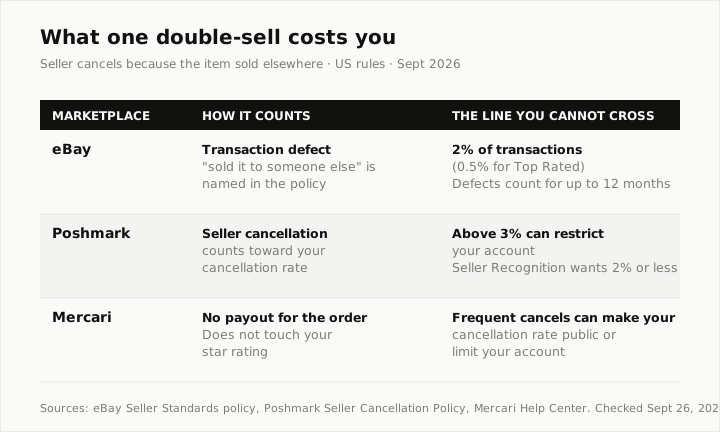
- eBay is the most explicit. Its seller standards policy lists "because they sold it to someone else" as a transaction defect. Stay at or under 2% of transactions to avoid Below Standard, or 0.5% if you want Top Rated.
- Poshmark counts seller cancellations toward your cancellation rate. Above 3% can restrict your account, and the new Seller Recognition badge wants 2% or less.
- Mercari does not dock your star rating, but its help center says frequent cancellations can bring a warning or an account limit, and can make your cancellation rate visible to other users.
Do the math on a small shop. At 30 eBay sales a month, one double-sell is already 3.3% of your transactions for that month. eBay looks at a longer window than one month (3 months if you have 400+ transactions, otherwise 12), so a single mistake will not sink you. Two or three in a slow quarter can.
Until July 2026, Poshmark's Excessive Listing Removal Policy made some sellers nervous about deleting listings at all. Poshmark retired that rule on July 23, 2026. Removing an item because it sold somewhere else is now plainly fine. Leaving it up is the risky move.
Step 1: Keep One Master Inventory
Pick one place that knows every item you own, where it is listed and whether it sold. It can be a spreadsheet, a notes app or a tool. What matters is that you trust it more than any single marketplace.
A spreadsheet needs these columns, and not many more:
| Column | Example | Why it matters |
|---|---|---|
| SKU | B14-027 | The one ID that ties every copy together |
| Item | Doc Martens 1460, W8, black | What you would search for |
| Bin / shelf | Bin 14 | So you can find it when it sells |
| Listed on | Posh, eBay, Depop | Every place you need to delist |
| Status | Active / Sold / Hold | The only column you update daily |
| Sold on + date | eBay, Sep 20 | For cancellations, returns and taxes |
If your bins are already numbered, build the SKU from the bin and a running number (bin 14, item 27 becomes B14-027). That way the SKU also tells you where the item lives. Our reseller inventory management guide goes deeper on storage and numbering.
Step 2: Put the SKU in Every Copy
When an item sells, you want to find the other copies in seconds. Search is the fastest way, so the SKU has to be somewhere each app will find it:
- eBay has a Custom label (SKU) field. Put it there, not in the title.
- Poshmark has no SKU field that buyers do not see, so add a short line at the bottom of the description, like "SKU B14-027".
- Depop and Mercari: same idea, last line of the description.
Buyers do not care about a code at the bottom of a description, and it saves you from scrolling a 300-item closet looking for "black boots".
Step 3: Decide Where Each Item Goes
You do not have to list everything everywhere. Every copy is one more delist, so spread items where they are likely to sell:
- Mall and contemporary women's brands (Lululemon, Free People, Madewell): Poshmark first, then Mercari.
- Menswear, vintage, anything people search by model number: eBay first.
- Y2K, streetwear, one-off trend pieces under $40: Depop.
- Things that sell in bundles or to collectors (cards, toys, sneakers): Whatnot, alongside eBay.
A useful rule: two marketplaces for most items, three or four for the items that have been sitting. The more copies an item has, the more careful you have to be with it. Our cross-listing strategy guide covers routing by category in more detail.
Step 4: Shrink the Gap Between the Sale and the Delist
Every double-sell happens in the same window: after the item sells on one app, before the other copies come down. You cannot make that window zero, but you can make it short.
If you delist by hand
- Turn on sale notifications for every app you sell on, including the ones you rarely open. Check that they are actually enabled in your phone settings.
- When a sale comes in, delist the other copies before you do anything else. Before printing the label. Before replying to the buyer.
- Search each app by SKU, delete the copy, then mark the row Sold in your master list.
- If you will be offline for a day (a trip, a busy weekend), go to vacation mode or pull the copies on your riskiest items first.
Tired of delisting by hand? FLIPSAIL checks your stores for sales and removes sold items everywhere else, free on 2 marketplaces. Start free
By hand works at a handful of sales a week. It breaks when sales come in while you are asleep, at work or at a thrift store. That is exactly when most double-sells happen.
If you use a tool
Tools that delist for you work in one of two ways, and it is worth knowing which one you are paying for:
- In your browser. An extension checks your marketplaces and removes the other copies. It is usually cheaper, but it generally needs your computer on and you signed in. Flyp's auto-delist, for example, runs when you are logged in and active in the app.
- In the cloud. The tool checks your marketplaces from its own servers, so it keeps going with your laptop closed. FLIPSAIL works this way.
Either way, ask how often it checks. No tool sees a sale the instant it happens, because most marketplaces do not announce sales to outside apps. FLIPSAIL checks most marketplaces every 30 minutes on paid plans (eBay also notifies it directly), and every 4 hours on the free plan. Grailed and Vinted can take up to 4 hours. So even with a tool, a fast-moving item can still sell twice in that window. It is rare, but not impossible.
What to Do When It Happens Anyway
Sooner or later something will sell twice. Handle it fast and plainly:
- Ship to the first buyer. The first completed order is the one you owe.
- Message the second buyer right away. One honest line ("so sorry, this sold on another app a few minutes before your order") gets a better response than silence.
- Cancel through the marketplace, not by asking the buyer to cancel for you. Get them their refund today, not in three days.
- Write down what went wrong: missed notification, slow delist, item not in the master list. Fix that one thing.
How Many Marketplaces Is Too Many?
There is no magic number. The limit is how fast you can delist. If you make fewer than five sales a week and check your phone often, three marketplaces by hand is fine. Past a sale a day, or if you are away from your phone for long stretches, you need either fewer copies per item or automation.
The cost of a tool is easy to compare against. If one avoided cancellation a month keeps an eBay account out of Below Standard, most delisting tools pay for themselves. For prices and which plans actually include auto-delist, see our cross-listing tools comparison.
Where FLIPSAIL Fits
Full disclosure: FLIPSAIL is our product, and it is built around step 4. You connect your marketplaces, it imports your listings into one inventory, and when something sells it removes the other copies from the cloud. On Mercari it flags the copy for you to remove, because Mercari auto-delist is not switched on yet.
The free plan does this between 2 marketplaces, checking every 4 hours, with no card and no time limit. Paid plans check every 30 minutes: $15/month for one marketplace, or $30/month for all 8, which also adds crosslisting between them. There is a 14-day trial with no card. If you only want the delisting part, you can keep the crosslister you already use and add FLIPSAIL next to it. More on how FLIPSAIL handles double-selling.
Frequently Asked Questions
Is it allowed to sell the same item on multiple platforms?
Yes. Poshmark, eBay, Depop, Mercari and Whatnot all allow it. What they penalize is cancelling an order because the item already sold somewhere else, so you have to remove sold copies quickly.
Does a double-sell cancellation hurt my eBay account?
Yes. eBay counts a cancellation because you sold the item to someone else as a transaction defect. You need to stay at or under 2% of transactions to avoid Below Standard, and 0.5% for Top Rated.
How fast do I need to delist after a sale?
As fast as you realistically can, and within the hour is a good target. Most double-sells happen when a sold item stays live for several hours, usually overnight or while you are away from your phone.
Can a cross-listing tool delist instantly?
Not quite. Most marketplaces do not notify outside apps when something sells, so tools check on a schedule. FLIPSAIL checks most marketplaces every 30 minutes on paid plans and every 4 hours on the free plan. Browser-extension tools usually need your computer on and you signed in.
How do I keep track of inventory across several marketplaces?
Keep one master list with a SKU for every item, and put that SKU in every copy you post (the Custom label field on eBay, the last line of the description elsewhere). When something sells, search each app by SKU and delete the other copies.
Should I list every item on every marketplace?
Usually not. Two marketplaces per item is a good default, with three or four for items that have been sitting. Every extra copy is one more thing to delist when it sells.